
Aze
Ad DirectorI used to download reference clips and then keep moving them around between different folders. Now they land in the library right away, I can categorize and star them, and a bunch of pointless busywork just disappears.
A visual and audio asset workbench built for creators. From precise capture to instant reuse, with built-in 4K video downloads, CatchBan reshapes the order and vitality of visual and audio assets for macOS creators.
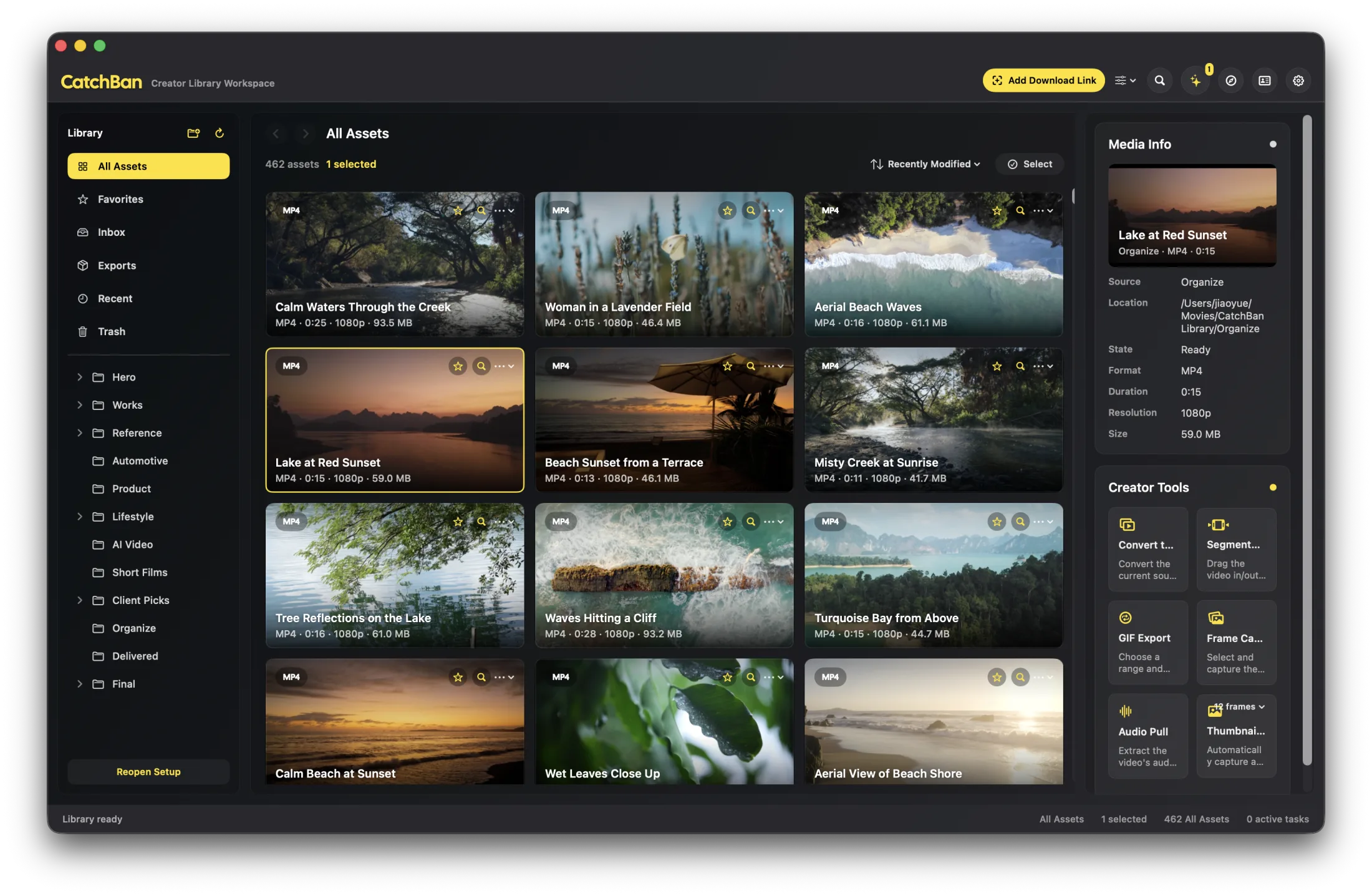
From ad campaigns and short-form editing to idea research and creator operations, CatchBan removes the mess so you can stay focused on making.
Stop jumping between browser tabs, downloaders, and folders. CatchBan unifies capture, management, and pre-creation prep in one creator workspace.
Focus on high-frequency creator sources such as YouTube, Vimeo, Bilibili, TikTok and more. Bring valuable media into your library in one step instead of managing scattered files.
Go beyond rigid system folders. Group assets by project, purpose, stage, or any structure that matches your production rhythm.
Stop switching between Finder and external players. Preview local assets fluidly, inspect frames precisely, and keep your creative momentum unbroken.
Transcode, segment clips, capture key frames, extract audio, export GIF, and batch snapshots without leaving your workspace.
👏 Creator Voices
These are beta-user comments from real usage scenarios, lightly edited to keep natural spoken tone.
I used to download reference clips and then keep moving them around between different folders. Now they land in the library right away, I can categorize and star them, and a bunch of pointless busywork just disappears.

The tools I use most are clip segments and key frames. When I am building a client deck, I can export a batch of key frames and GIFs fast, and the whole process moves a lot quicker.

The worst part of writing a director's treatment is always hunting for reference clips. Now I can group footage by type and mood, cut a segment in one click, and drop it straight into my deck.
Downloading a clip used to be pure luck. Extensions would break all the time, and if I was in a rush I had to screen-record as backup. With CatchBan, the sites I use most just work, and downloads are fast.

I am collecting references every day. Being able to save first and sort later keeps me moving and makes it much harder for good ideas to slip away.
The biggest thing for me is traceability. I can jump from an export right back to the source in seconds, so review rounds stay clean and nobody wastes time asking where a file came from.

Pulling together pitch materials used to mean opening way too many apps. Now I can filter shots, export GIFs, and grab key frames in one workspace, so the creative flow does not get derailed by tool clutter.

My favorite feature is hover preview. It makes picking footage really fast, and I can drag starred clips straight into my editor, so prep takes about half the time.

I run my whole creator workflow solo, so the last thing I need is a complicated process and constant app-switching. CatchBan connects collecting through output, and I can finish an extra video most days.

No subscription. Just your Mac and your workflow.